Actions
Feature #32
openEpic #28: Provider Portal
Add Medications, Clinical Notes, and Recommend Peptide Stack During Appointment
Status:
Feedback
Priority:
Normal
Assignee:
-
Start date:
11/06/2025
Due date:
% Done:
0%
Description
Description
Allow the Provider to add medications, clinical notes, and recommend a Peptide Stack to the patient during or after a meeting from the Appointment Details screen.
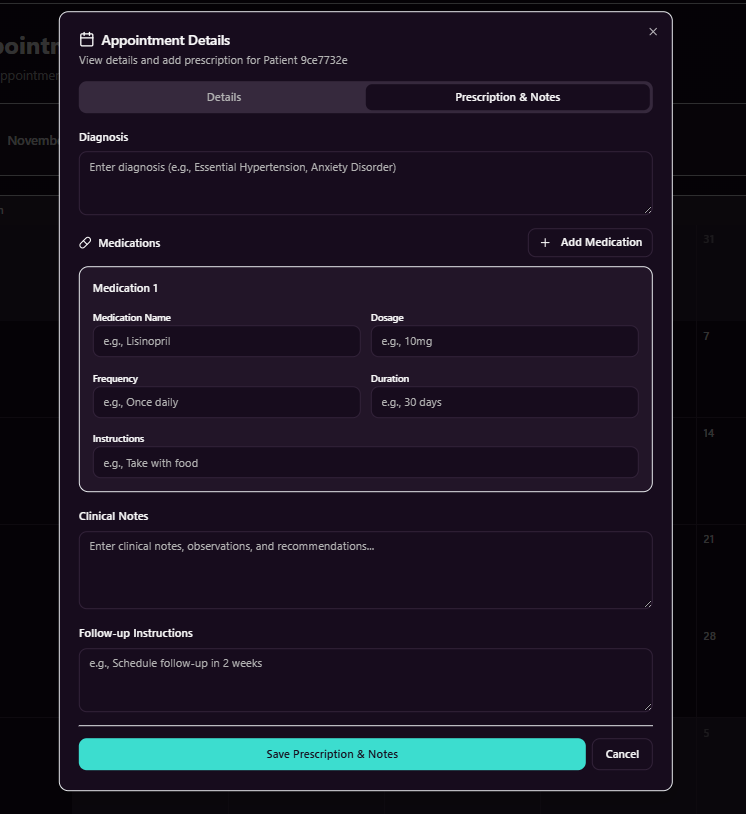
1. Medications
Provider can add one or multiple medications during the appointment.
Fields:
- Medication Name
- Dosage
- Frequency
- Duration
Instructions
- Ability to add/remove medications before saving.
- Medications are saved against the appointment.
2. Clinical Notes
- Provider can enter short clinical notes during or after the meeting.
- Notes include observations, diagnosis, and recommendations.
- Notes are editable until the appointment is marked as completed.
- Notes are stored as part of the clinical record (provider-only unless approved).
3. Peptide Stack Recommendation
- Provider can recommend one or more Peptide Stacks to the patient.
- Recommendation is linked to the appointment.
- Patient can view recommended Peptide Stack(s) after the appointment.
- Patient can proceed to purchase the recommended Peptide Stack from the portal.
4. Access & Permissions
- Only Providers can add or edit medications, notes, and recommendations.
- Patients have read-only access to approved summaries and recommendations.
Acceptance Criteria
- Provider can save medications and notes without leaving the appointment screen.
- Multiple medications can be added in one appointment.
- Peptide Stack recommendations are visible to the patient post-appointment.
- Data is saved securely and linked to the correct appointment.
Files
Actions