Epic #236
open
Application-Wide Timezone Support
Added by Redmine Admin 10 months ago.
Updated 8 months ago.
Description
Description:
Implement timezone handling across the application so that all date and time values are displayed to users based on their configured timezone.
Requirements:
- Store all system date and time values in UTC at the database level.
- Each user must have an associated timezone setting.
- Convert and display date and time values according to the user’s timezone in:
- Appointments
- Provider availability slots
- Notifications (in-app)
- Audit logs and email logs (view layer only)
- Timezone conversion must be applied consistently across web and mobile clients.
- Default timezone should be applied if the user has not explicitly set one.
- Ensure daylight saving time adjustments are handled correctly.
Acceptance Criteria:
- All stored timestamps remain in UTC.
- Users see dates and times correctly converted to their timezone.
- Appointment times match the user’s local time.
- No mismatch between backend data and UI display.
Files
- Status changed from Archieve to Ready to QA
- Assignee changed from Abhishek Thakur to Deeksha Singh
Time zone has been implemented across the application and is ready for QA.
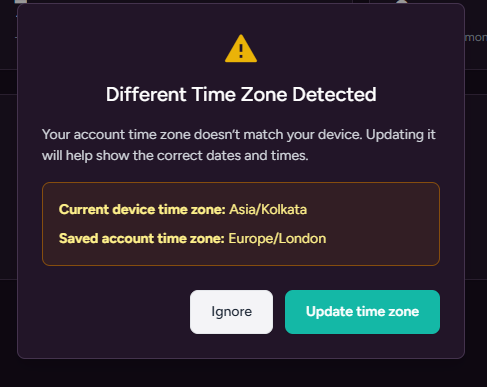
This change was added to inform users when their device time zone is different from their account time zone.
It helps prevent confusion caused by incorrect date and time displays and allows users to quickly update their time zone to ensure accurate scheduling, notifications, and time-based data.
Test cases for the above:
- Verify that user can set and save a time zone in My Account.
- Verify that provider-created slots follow the provider’s time zone.
- Verify that patients see available slots in their own time zone.
- Verify that a booked appointment shows the correct time for both provider and patient.
- Verify that the same appointment represents the same moment across different time zones.
- Verify that provider can view booked appointments correctly in calendar view.
- Verify that provider can join the appointment at the correct local time.
- Verify that changing a user’s time zone updates appointment display correctly.
- Verify that appointment date and time do not shift incorrectly due to time zone change.
- Verify that appointment cancellation does not affect time accuracy on either side.
- Verify that provider and patient are getting notifications with correct time.
- Verify that appointment booking notification shows correct time for both provider and patient.
- Verify that appointment cancellation notification shows correct time for both provider and patient.
- Verify that patient can book an appointment only with providers who have permission in the patient’s selected area (practicing state).
- Verify that providers outside the patient’s selected area are not visible for booking.
- Verify that booking is blocked if provider does not have permission for the patient’s area.
- Status changed from Ready to QA to Ready To PROD
- Status changed from Ready To PROD to Ready To UAT
Also available in: Atom
PDF