Actions
Task #36
openEpic #13: Patient Portal
Feature #16: Stripe and checkout pages
Subscribe to a Health Plan
Start date:
11/06/2025
Due date:
% Done:
0%
Estimated time:
Description
User Story:
As a patient, I want to subscribe to a selected health plan so that I can access its benefits and services.
Acceptance Criteria :
- From the Plans page, user can click Subscribe on a chosen plan.
- System shows a confirmation step summarizing plan name, price, duration and any trial/intro offers.
- If payment is required, user can provide payment details and confirm the charge.
After successful confirmation/payment :
- Plan status becomes Active for the user.
- Subscription start and end dates are recorded.
- The user is shown an onscreen confirmation and returned to the Plans or Dashboard.
- System stores the subscription record in the backend with start/end dates and plan id.
- A notification (in-app) is created informing user of successful subscription.
Notes for QA :
- Subscribe to a paid plan and verify active status, start/end dates saved.
- Test subscription flow with and without payment required.
- Confirm confirmation UI and redirection behavior.
- Check subscription record in backend (if accessible).
Files
Updated by Redmine Admin 11 months ago
Redmine Admin wrote:
User Story:
As a patient, I want to subscribe to a selected health plan so that I can access its benefits and services.Acceptance Criteria :
- From the Plans page, user can click Subscribe on a chosen plan.
- System shows a confirmation step summarizing plan name, price, duration and any trial/intro offers.
- If payment is required, user can provide payment details and confirm the charge.
After successful confirmation/payment :
- Plan status becomes Active for the user.
- Subscription start and end dates are recorded.
- The user is shown an onscreen confirmation and returned to the Plans or Dashboard.
- System stores the subscription record in the backend with start/end dates and plan id.
- A notification (in-app) is created informing user of successful subscription.
Notes for QA :
- Subscribe to a paid plan and verify active status, start/end dates saved.
- Test subscription flow with and without payment required.
- Confirm confirmation UI and redirection behavior.
Actions
#3
Updated by Abhishek Thakur 9 months ago
- File clipboard-202601061906-fhxuo.png clipboard-202601061906-fhxuo.png added
- File clipboard-202601061907-piedg.png clipboard-202601061907-piedg.png added
- File clipboard-202601061910-zgqud.png clipboard-202601061910-zgqud.png added
Service Pack Payment Flow
- User sees the Service Pack selection page. [
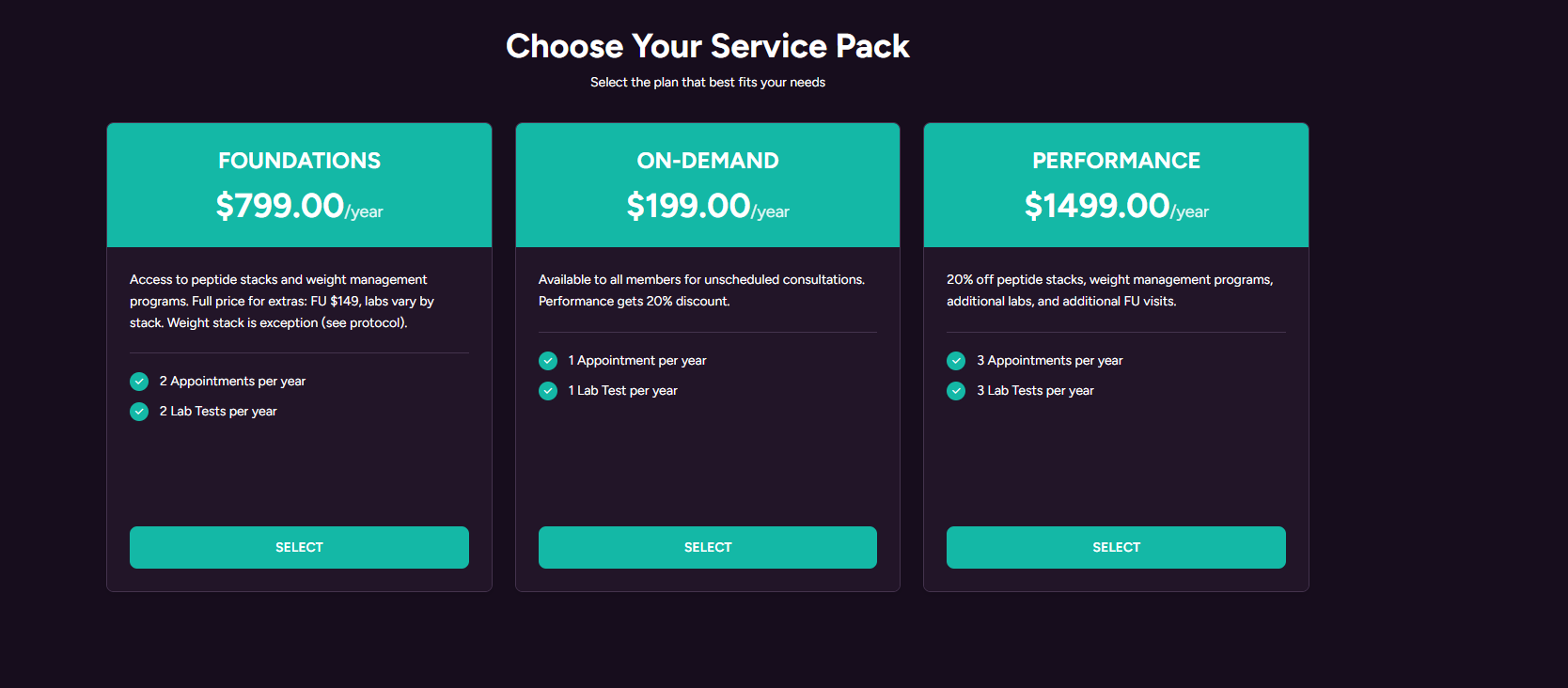 ]
] - User selects a plan and is redirected to Stripe Checkout.
- If a card is already saved, Stripe Link shows the saved card first.[
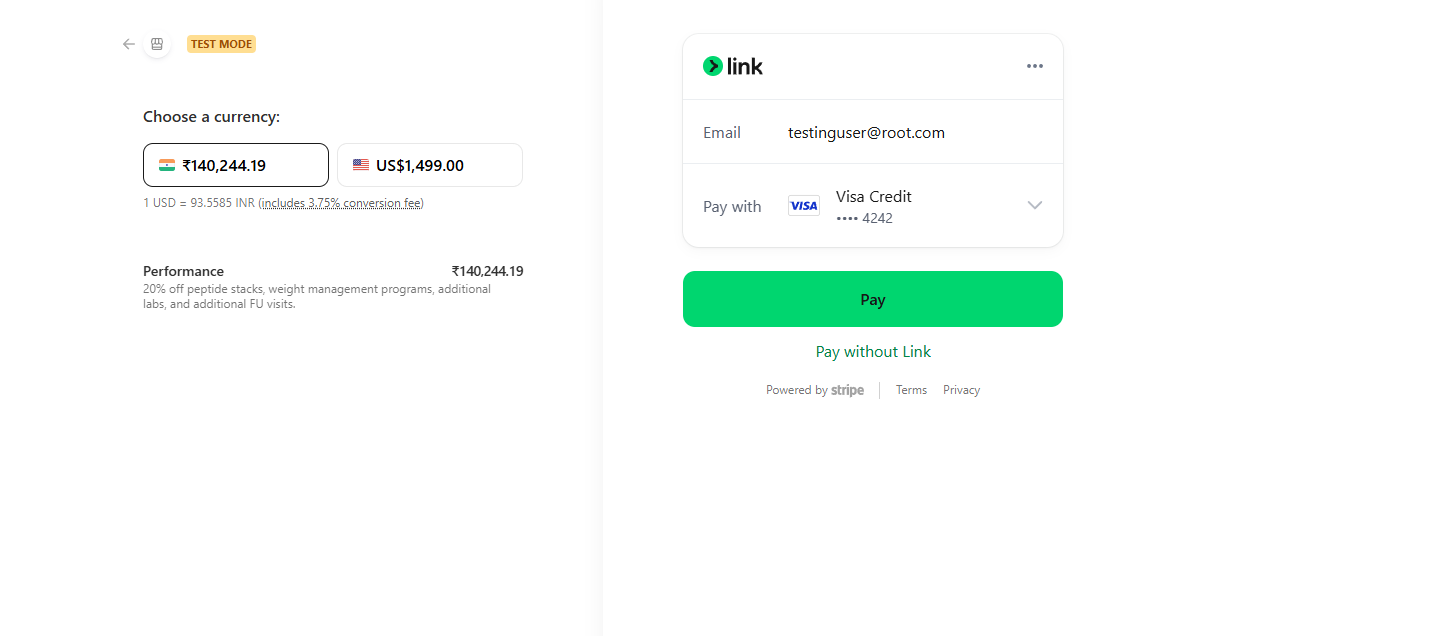 ]
] - The user can continue with the saved card or enter a new card.[
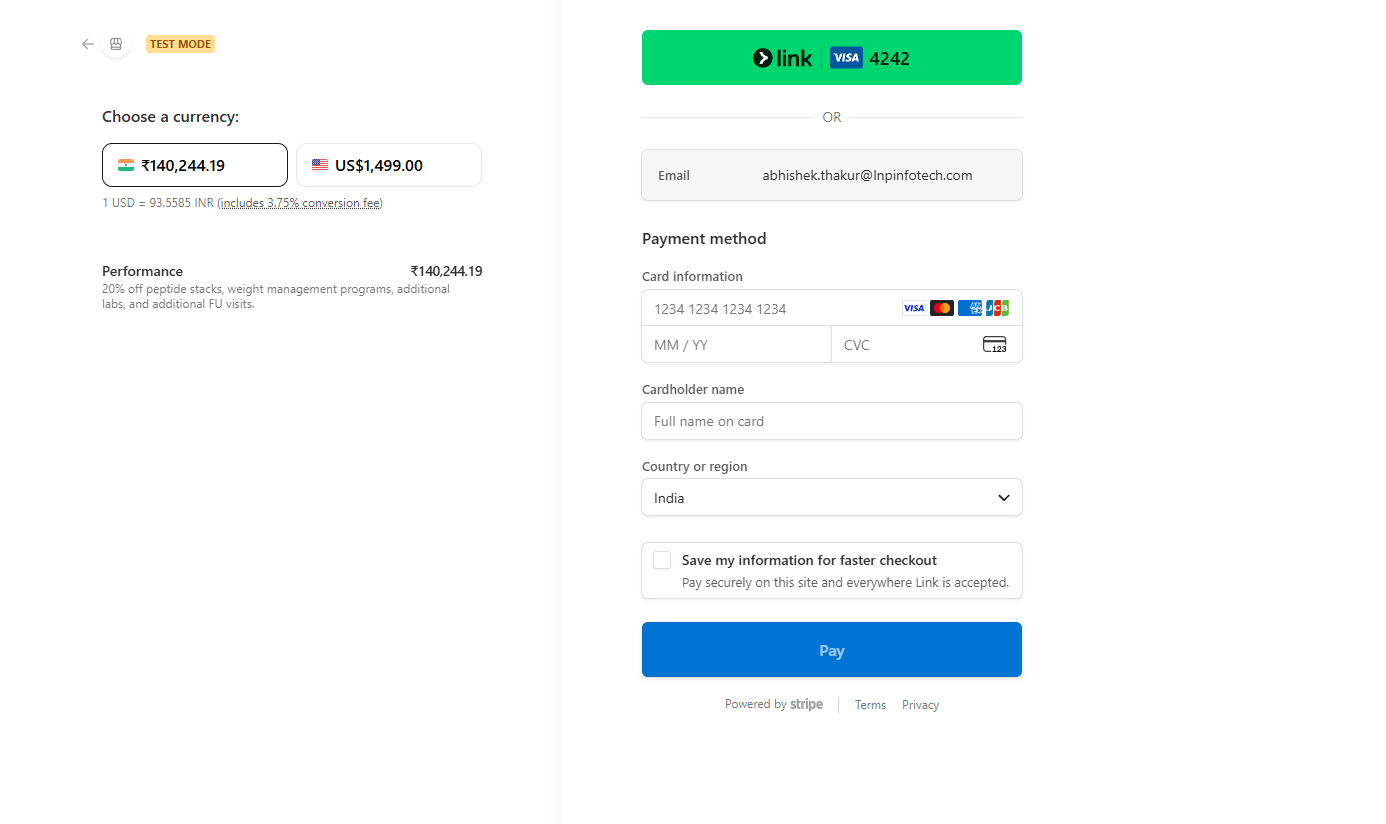 ]
] - Payment is completed on Stripe.
- Backend receives the checkout.session.completed webhook.
- Card metadata is saved in the database.
- Selected service pack is activated and payment history is updated.
Updated by Abhishek Thakur 9 months ago
- Status changed from Archieve to Ready to QA
- Assignee set to Deeksha Singh
Updated by Deeksha Singh 8 months ago
- Status changed from Closed to Ready To PROD
QA test cases
- Verify user can view the Service Pack selection page with all available plans displayed correctly.
- Verify user is redirected to Stripe Checkout after selecting a service pack.
- Verify Stripe Link displays saved card details when a card is already saved.
- Verify user can complete payment using either a saved card or a new card.
- Verify successful payment triggers checkout.session.completed webhook.
- Verify card metadata is saved correctly in the database after payment.
- Verify selected service pack is activated immediately after successful payment.
- Verify payment details are recorded correctly in payment history.
Updated by Deeksha Singh 8 months ago
- Status changed from Ready To PROD to Ready To UAT
Actions